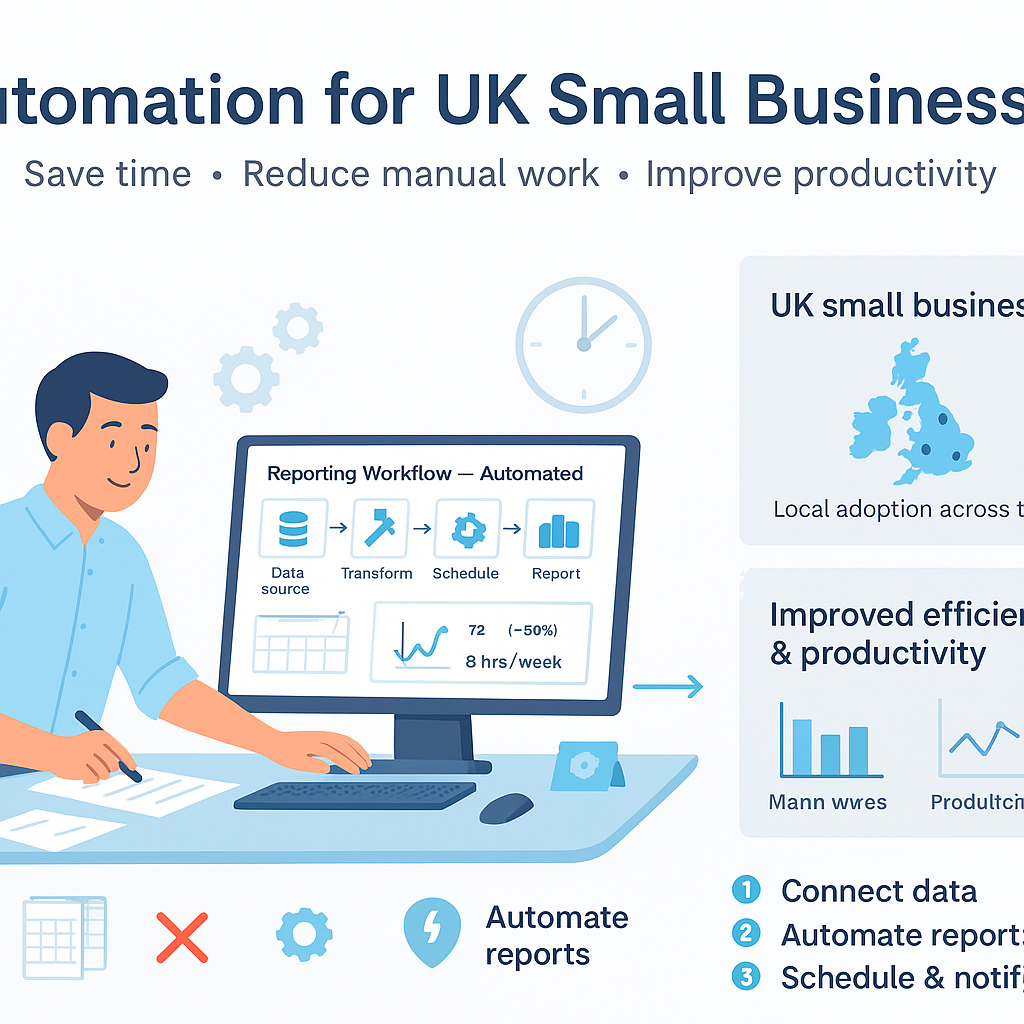
How to Automate Reporting Workflows for UK Small Businesses: Reduce Spreadsheet Chaos
UK small businesses waste up to 20 hours a month on manual spreadsheet reporting – discover how to automate reporting workflows UK small businesses and reclaim that time.
Why UK Small Businesses Are Drowning in Spreadsheet Chaos
Struggling to automate reporting workflows UK small businesses face daily spreadsheet chaos that drains time, invites errors, and hampers growth. Manual data compilation from accounting software, sales platforms, and customer records turns routine reporting into a nightmare for busy owners and managers.
This inefficiency not only increases admin burdens but also risks inaccurate insights, compliance issues under GDPR, and missed opportunities in a competitive market.
In this guide, we’ll explore practical steps to automate your reporting, integrate tools seamlessly, and deliver real-time business reports that empower informed decisions.
The Pain Points of Manual Reporting Workflows
Manual reporting workflows are a significant drain on resources for UK small businesses. Owners and managers often spend countless hours copying data from various sources into spreadsheets, only to battle with formulas that break at the slightest change. This repetitive task not only consumes valuable time but also opens the door to human errors that can distort financial insights and operational decisions.

Manual processes can amplify small errors into major financial misstatements, potentially leading to incorrect tax filings or misguided investments. Always double-check critical figures before acting on them.
- Endless data entry from accounting software like Xero or QuickBooks into Excel.
- Error-prone formula copying and manual calculations that lead to inaccuracies.
- Version control issues with multiple spreadsheet copies floating around.
- Time delays in compiling and sharing reports, often missing deadlines.
- Scalability problems as transaction volumes increase with business growth.
- Track hours spent on reporting tasks weekly.
- Note frequency of formula errors or data mismatches.
- Check if reports are delivered late more than 20% of the time.
- Assess team frustration levels during reporting cycles.
Common Symptoms of Reporting Inefficiency
Reporting inefficiency manifests in several telltale signs that UK small businesses should watch for. Late reports are a classic symptom, where what should be a quick weekly summary stretches into days of frantic catch-up work. This not only stresses the team but also delays strategic decisions.
Frequent formula errors in spreadsheets are another red flag. Staff spend more time fixing broken links and recalculating totals than analysing the data. Coupled with team frustration – groans at the mention of ‘reporting time’ – these symptoms indicate a workflow that’s unsustainable.
Reliance on outdated data rounds out the common issues. Reports based on last month’s figures can’t support agile responses to market shifts, leaving businesses reactive rather than proactive. Spotting these symptoms early can prevent escalation.
- Reports consistently delivered after deadlines.
- Regular complaints about spreadsheet errors or crashes.
- Team members avoiding or dreading reporting tasks.
- Use of old data in meetings and decisions.
- Inconsistent report formats across different periods.

If three or more of these symptoms appear monthly, your reporting workflow needs attention. Tally them up to gauge severity.
- Review last month’s report timelines.
- Survey team on reporting pain levels.
- Audit recent reports for data freshness.
- Check error logs in shared spreadsheets.
Root Causes of Spreadsheet Overload in UK SMEs
The root of spreadsheet overload in UK SMEs lies in fragmented data sources. Accounting software, CRM systems, and e-commerce platforms each hold siloed data, requiring manual extraction and reconciliation – a process prone to oversight amid busy operations.
Lack of integration between popular UK tools like Xero, QuickBooks, and sales platforms exacerbates this. Without automated bridges, teams resort to copy-paste marathons. Skill gaps compound the issue; not every manager is spreadsheet-proficient, leading to bottlenecks.
Resistance to change and tight margins further entrench manual habits. Under regulatory pressures like GDPR and with limited budgets, investing in new processes feels risky, perpetuating the cycle of overload.
- Fragmented data across multiple unconnected tools.
- No native integrations between accounting and reporting apps.
- Team skill gaps in advanced spreadsheet functions.
- Cultural resistance to adopting new workflows.
- Regulatory and cost pressures delaying upgrades.
- List all data sources used in reporting.
- Identify integration gaps between tools.
- Assess team Excel proficiency levels.
- Evaluate budget for workflow improvements.
The Benefits of Automating Reporting Workflows for UK Small Businesses
Automating reporting workflows UK small businesses transforms chaos into clarity. Real-time dashboards provide instant access to key metrics, eliminating the wait for manual compilations and enabling swift, data-driven decisions.
Error reduction is profound; automated data flows from source to report minimise human input, ensuring accuracy that manual processes can’t match. Time savings are equally compelling, with many SMEs reporting up to 80% reduction in reporting hours.
Scalability becomes effortless as automations handle growing data volumes without proportional effort increases. Enhanced GDPR compliance through logged data trails adds peace of mind, protecting against regulatory pitfalls.
- Real-time business reports and dashboards.
- Up to 80% reduction in manual reporting time.
- Drastically lower error rates in data handling.
- Seamless scalability for growing operations.
- Improved GDPR compliance via audit trails.
- Frees staff for higher-value analysis tasks.

SMEs automating reports often see 20 hours/month reclaimed, translating to £500+ in productivity gains at average UK wages.
- Calculate current reporting time costs.
- Project time savings post-automation.
- Identify key metrics for real-time tracking.
Essential Automated Reporting Tools and Integrations
Several accessible tools make it straightforward to automate reporting workflows UK small businesses. No-code platforms like Zapier and Make (formerly Integromat) excel at connecting apps without programming, ideal for SMEs.
Microsoft Power Automate integrates seamlessly with Office 365, common in UK businesses, while dashboard tools like Google Data Studio (now Looker Studio) or Power BI visualise data compellingly. For advanced needs, Tableau offers robust options.
Key is choosing GDPR-compliant tools with UK data centres. Integrations with Xero, QuickBooks, and Shopify automate data pulls, compiling reports effortlessly.
- Zapier: Simple app connections for beginners.
- Make: Advanced automations with visual builders.
- Power Automate: Native for Microsoft users.
- Google Looker Studio: Free dashboards from multiple sources.
- Power BI: Interactive reports with AI insights.
- Tableau: Enterprise-grade visuals for complex data.

Prioritise tools with EU/UK data residency like those from Google Cloud or Microsoft Azure.
- Verify tool GDPR compliance certifications.
- Test free tiers with your data sources.
- Check integration availability for Xero/QuickBooks.
Step-by-Step Guide to Automate Reporting Workflows
Begin by assessing your current workflow: map data sources, report frequency, and pain points. This baseline ensures your automation targets real needs without overcomplicating.
Select tools based on your stack – e.g., Zapier for quick wins. Map data flows: trigger on new sales data in Shopify, pull from Xero, compile in Google Sheets or a dashboard.
Test rigorously with sample data before going live. Monitor initial runs, refine triggers, then rollout to the team with training. Scale gradually as confidence builds.
- Assess current processes and identify key reports.
- Choose compatible tools and integrations.
- Design data flows and automation triggers.
- Build and test with dummy data.
- Deploy, train team, and monitor performance.
- Iterate based on feedback and results.

Never deploy untested automations on live data; use samples to catch issues early and avoid data corruption.
- Document current workflow map.
- Set up test accounts in tools.
- Run full cycle tests thrice.
- Train at least one backup user.
- Schedule weekly checks post-launch.
Managing Risks and Ensuring GDPR Compliance
While automation streamlines reporting, risks like data inaccuracies from failed integrations or sync errors persist. Regular validation checks are essential to maintain trust in outputs.
GDPR compliance demands careful handling of personal data in reports. Use tools with data minimisation, anonymisation features, and audit logs. UK SMEs must appoint data processors compliant with post-Brexit rules.
Integration failures or over-reliance on automations can disrupt operations; build redundancies and alerts. Proactive monitoring turns potential issues into manageable ones.
- Validate report accuracy weekly against source data.
- Implement data anonymisation for sensitive reports.
- Set up failure notifications in automation tools.
- Conduct quarterly GDPR audits on data flows.
- Document all automations for accountability.

Fines up to 4% of turnover await mishandled personal data. Choose certified tools and log all accesses.
- Review tool privacy policies.
- Test data flows for PII exposure.
- Set up automated error alerts.
- Train staff on data handling rules.
Best Practices for Long-Term Reporting Automation
Sustainability starts with team training: ensure multiple staff understand the automations to avoid single points of failure. Regular performance monitoring via built-in analytics keeps systems optimised.
Scale thoughtfully by reviewing automations quarterly, adding new data sources as needed. Foster a culture of continuous improvement, soliciting feedback to refine reports.
Compliance remains paramount; integrate annual GDPR refreshers and tool updates. This approach turns automation into a reliable asset rather than a temporary fix.
- Train 2-3 team members per automation.
- Monitor usage and error rates monthly.
- Review and update automations quarterly.
- Gather user feedback on report usefulness.
- Stay current with tool and regulation updates.

Use automation dashboards to track ROI, like time saved vs. setup effort.
- Schedule training sessions.
- Set monitoring dashboards.
- Plan quarterly reviews.
- Collect feedback forms.
Transform Your Reporting: Achieve Efficiency and Accuracy
Automating reporting workflows UK small businesses is a game-changer, replacing spreadsheet drudgery with reliable, real-time insights. By addressing pain points and implementing proven steps, you can reclaim hours, reduce errors, and focus on growth.
Remember, success lies in starting small, choosing compliant tools, and maintaining vigilance. Professional advice can tailor solutions to your unique needs, ensuring compliance and efficiency.
Take the first step today towards streamlined reporting – your business will thank you with sharper decisions and smoother operations.
Key points
- Manual spreadsheet reporting creates chaos for UK small businesses, wasting time and risking errors.
- Automating reporting workflows UK small businesses unlocks real-time insights, reduces admin by up to 80%, and ensures GDPR compliance.
- Start with essential tools like Zapier and integrations with accounting software for quick wins.
- Always test automations thoroughly and monitor for accuracy to avoid compliance pitfalls.
- Implement step-by-step to scale efficiently as your business grows.
- Prioritise GDPR-compliant tools and regular reviews for sustainable reporting success.
Frequently asked questions
Is automating reporting workflows suitable for small UK businesses?
Yes, automating reporting workflows is highly suitable for small UK businesses, regardless of size, as long as processes are clearly defined. Tools like Zapier or Power Automate can connect common applications such as Xero and QuickBooks without needing advanced technical skills, helping to reduce manual spreadsheet work and improve accuracy. The key is starting with simple reports to build confidence before scaling.
How long does it take to set up automated reporting workflows?
The time required to set up automated reporting workflows varies depending on the complexity of your data sources, the number of integrations needed, and the clarity of your existing processes. Simple automations connecting two or three tools might take a few hours to a day, while more comprehensive setups could span several days, including testing phases. Thorough planning upfront minimises delays.
Will automation tools work with my existing accounting software like Xero or QuickBooks?
Most popular automation tools integrate seamlessly with widely used UK accounting software such as Xero, QuickBooks, and Sage. Platforms like Zapier, Make, and Microsoft Power Automate offer pre-built connectors that pull data automatically, reducing the need for manual exports. Always check the tool’s integration directory and test compatibility with your specific setup during the free trial period.
What are the GDPR risks when automating reporting workflows?
GDPR risks in automated reporting primarily involve the handling of personal data, such as customer details in sales reports. To mitigate these, select tools with UK or EU data centres, enable data anonymisation where possible, and maintain audit logs of all data flows. Regular reviews ensure compliance, and using certified processors helps small businesses meet regulatory obligations without undue burden.
What happens if an automated reporting workflow breaks?
If an automated reporting workflow fails, most tools send immediate alerts via email or dashboard notifications, allowing quick diagnosis of issues like integration glitches or data source changes. Having redundancies, such as manual overrides, and training multiple team members ensures continuity. Regular monitoring and testing prevent disruptions, keeping your business reporting reliable.
Ready to Eliminate Spreadsheet Chaos?
Get expert guidance from Business Automations UK to assess your reporting workflows and implement tailored automations that fit your business needs. Start your journey to efficient, compliant reporting today.
This article is for general information only. It is not legal, financial, or compliance advice. If you are unsure about GDPR, HMRC, or regulatory obligations, speak to a qualified professional or reach out to us for more information.
Related Posts
Should I Use AI to Build My Website? Pros, Cons & Costs


How to Automate Client Onboarding for UK SMEs: A Practical Guide

How to Automate Insurance Claim Processing for UK SMEs: Streamline Approvals & Reduce Admin

How to Automate Subscription Billing for UK SMEs: Reduce Churn & Streamline Recurring Payments
How to Automate Health and Safety Incident Reporting for UK SMEs: Streamline Compliance & Reduce Liability
How to Automate Purchase Order Approval Workflows for UK SMEs: Cut Delays & Boost Compliance

How to Automate Vendor Invoice Processing for UK SMEs: Speed Up Payments & Reduce Errors
How to Automate Invoice Payment Chasing for UK Small Businesses: A Proven 5-Step Guide
How to Automate Supplier Onboarding for UK SMEs: Streamline Procurement & Ensure Compliance

How to Automate Inventory Management for UK SMEs: Reduce Stock Errors & Boost Efficiency
How to Automate Risk Assessment Workflows for UK SMEs: A Compliance Guide

How to Automate GDPR Data Retention Policies for UK SMEs: Delete Personal Data Lawfully
- Should I Use AI to Build My Website? Pros, Cons & Costs
- How to Automate Client Onboarding for UK SMEs: A Practical Guide

- How to Automate Insurance Claim Processing for UK SMEs: Streamline Approvals & Reduce Admin
- How to Automate Subscription Billing for UK SMEs: Reduce Churn & Streamline Recurring Payments
- How to Automate Health and Safety Incident Reporting for UK SMEs: Streamline Compliance & Reduce Liability